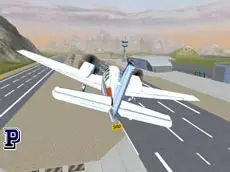
Free Flight Sim
Take to the skies in this 3D airplane simulator where you can master flight mechanics, explore vast environments, and experience the technical side of piloting various aircraft.
About Free Flight Sim
Free Flight Sim offers a detailed 3D aviation experience focused on the technical aspects of flying. Players take control of aircraft, managing engine power and wing adjustments to maintain steady flight. The simulator emphasizes realistic movement and spatial awareness, providing a sandbox environment where you can practice takeoffs, landings, and complex maneuvers without the pressure of specific combat missions or racing objectives.
The game appeals to fans of technical simulators who enjoy mastering control layouts and physics-based movement. With multiple camera perspectives and visual aids like air trails, it provides a comprehensive view of how an aircraft responds to different inputs. The focus remains on the skill of piloting and the freedom of the open sky in a realistic 3D setting.
Why players like Free Flight Sim
- Realistic 3D flight physics and aircraft handling.
- Multiple camera angles for enhanced spatial awareness.
- Technical control over engine output and wing tilt.
- Visual air trails to help track flight paths and maneuvers.
Instructions
 = flying
QE = tilt rear wing
↑↓ = engine power
I = start engine
C = change view
B = brakes
T = air trails
ESC = leave fullscreen
How to play
Begin by starting the engine and increasing power to gain sufficient speed for takeoff. Use the keyboard to manage your altitude and direction while adjusting the rear wing for stability. You can toggle between different camera views to assist with navigation or landing. Focus on balancing engine output with your flight angle to maintain a steady trajectory throughout your flight session.
Tips for beginners
- Monitor engine power carefully during takeoff and landing to maintain control.
- Use the rear wing tilt for more precise adjustments during complex maneuvers.
- Switch camera views frequently to get a better sense of your altitude and surroundings.
- Apply brakes gradually when touching down to ensure a smooth and safe stop.