Block Craft 3D
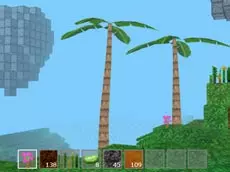
Block Craft 3D offers a creative sandbox experience where players explore a three-dimensional environment, mine resources, and build structures in a world inspired by classic block-building mechanics.
About Block Craft 3D
This 3D simulator invites players into a vast, block-based landscape focused on exploration and construction. By navigating the terrain and interacting with various elements, you can reshape the environment to suit your vision. The game emphasizes creative freedom, allowing for the placement and removal of blocks to craft unique structures or modify the existing terrain through simple mining actions.
As an adventure-style simulator, it provides a relaxed pace suitable for players who enjoy architectural planning and resource management. The inclusion of saving and loading features ensures that long-term projects can be maintained over multiple sessions. Whether you are interested in simple landscaping or complex building, the mechanics support a steady sense of progress within its stylized, open-ended world.
Why players like Block Craft 3D
- Open-ended sandbox gameplay that encourages creative expression.
- Intuitive mining and building mechanics for easy environment manipulation.
- Ability to save and load progress to protect large-scale projects.
- First-person perspective that enhances immersion during exploration.
Instructions
 = move
 = mine
SPACE = jump
19 = select item
T = throw item
C = add tree
ESC = pause
CTRL+S = save
CTRL+L = load
How to play
Navigate the 3D world using keyboard controls to find suitable building sites. Use your mouse to mine existing blocks and gather materials for your inventory. Select different items from your hotbar to place blocks or add specific elements like trees to the landscape. To keep your creations safe, remember to use the manual save function frequently so you can resume your progress during your next session.
Tips for beginners
- Use the hotbar shortcuts (1-9) to quickly switch between different building materials.
- Save your game regularly using the keyboard shortcut to avoid losing progress on complex builds.
- Utilize the jump mechanic to reach higher elevations or navigate uneven terrain more efficiently.
- Experiment with the tree placement tool to add natural variety and verticality to your environment.