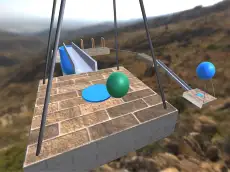
Extreme Ball Games
Navigate a ball through challenging environments in this 3D action game that tests your coordination and precision using responsive keyboard and mouse controls.
About Extreme Ball Games
Extreme Ball Games focuses on physics-based movement where players control a rolling ball across various courses. The 3D perspective allows for a full range of motion as you navigate through different obstacles. The core experience relies on maintaining momentum while ensuring the ball stays on the designated path, requiring steady input and careful observation of the surroundings.
This title appeals to fans of skill-based action games who enjoy mastering momentum and spatial awareness. The inclusion of camera rotation controls provides a tactical advantage, allowing players to survey the environment from multiple angles. It is a straightforward yet demanding experience suitable for players looking for a test of dexterity and focus in a clean, 3D environment.
- Genre: Action
- Platform: Browser
- Mode: Singleplayer
- Developer: GamesCreative
- Recommended age: 3+
- Mobile support: No
- Release: 02/09/2021
Why players like Extreme Ball Games
- Responsive 3D physics and ball movement.
- Full camera control for improved visibility.
- Clean visual style that emphasizes gameplay mechanics.
- Challenging navigation that rewards precision.
Instructions


QE = rotate camera
How to play
Use the WASD keys to guide the ball across the terrain. Use your mouse or the Q and E keys to rotate the camera view, which is essential for lining up movement or navigating narrow sections. Your goal is to reach the end of each course by balancing speed with precise steering. Success depends on your ability to maintain control while adjusting your perspective to suit the environment.
Tips for beginners
- Rotate the camera frequently to spot upcoming obstacles and path changes early.
- Adjust your speed carefully when approaching sharp turns or narrow edges to avoid losing control.
- Use the Q and E keys for quick camera adjustments while keeping your fingers on the movement keys.