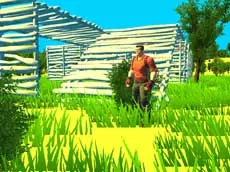
Fort Building Simulator
Master your construction skills in this 3D simulator where you can quickly build walls, floors, and stairs to create complex defensive structures in a sandbox environment.
About Fort Building Simulator
Fort Building Simulator provides a dedicated space for players to refine their construction techniques within a 3D environment. The simulator focuses on the mechanics of rapid assembly, allowing for the placement of various structural components like floors and stairs while navigating the terrain. It is designed for those who want to practice their layout speed and structural accuracy without the distractions of a full competitive match.
The experience emphasizes fluid movement and keyboard-based building. By using specific hotkeys for different architectural elements, players can develop the muscle memory needed for high-speed construction. Whether you are aiming to build tall towers or expansive bases, the simulator offers a clean and responsive platform to test out different designs and movement patterns.
Why players like Fort Building Simulator
- Dedicated environment for building practice
- Responsive 3D movement and navigation
- Streamlined structural placement mechanics
- Focus on improving construction speed and accuracy
Instructions
 = move
 = interaction
SPACE = jump
SHIFT = run
P = menu
C = stairs
Q = floor
V = wall
How to play
Navigate the 3D space using the WASD keys and look around with your mouse. Use the dedicated building shortcuts—Q for floors, V for walls, and C for stairs—to assemble your structures. You can combine running and jumping with these building actions to create vertical paths or large enclosures. Use the menu key to manage your session settings at any time during the simulation.
Tips for beginners
- Hold the run key while building to practice construction at high speeds.
- Combine jumping with the stairs hotkey to quickly gain height.
- Practice switching rapidly between walls and floors to create more stable layouts.
- Focus on your mouse placement to ensure pieces connect exactly where you want them.