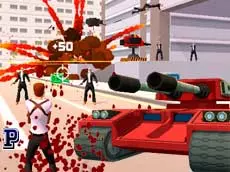
Hammer 2: Reloaded
Step into a gritty 3D urban environment to complete missions using a variety of weapons and vehicles in this action-packed shooter inspired by classic open-world titles.
About Hammer 2: Reloaded
Hammer 2: Reloaded delivers a fast-paced third-person shooting experience set within a sprawling 3D city. Players take on the role of a skilled operative tasked with clearing out criminal elements through a series of missions. The gameplay emphasizes mobility and precision, allowing for a mix of tactical positioning and direct confrontation in an environment where threats can appear from any corner.
The game features various tools to handle hostiles, including standard firearms and explosive grenades. Beyond on-foot combat, the environment offers opportunities to interact with heavy machinery, such as tanks, to gain a tactical advantage. This combination of ground-level shooting and vehicular action caters to fans of sandbox-style action games who enjoy variety in how they approach their objectives.
- Genre: Action, 3D
- Platform: Browser
- Mode: Singleplayer
- Developer: Faramel Games
- Mobile support: No
- Release: 11/30/2016
Why players like Hammer 2: Reloaded
- Engaging 3D urban environment with sandbox-style movement.
- Ability to pilot heavy vehicles like tanks for increased firepower.
- Slow-motion mechanic that allows for precise aiming during intense firefights.
- A variety of mission objectives that challenge player reflexes and strategy.
- Smooth keyboard and mouse controls optimized for high-speed action.
Instructions


E = interaction
dbl ESC = pause
SHIFT = slow motion
SPACE = jump
V = view back
X = grenades
How to play
Navigate the city using the WASD keys and aim your weapon with the mouse. Your primary goal is to complete specific mission objectives while eliminating hostiles. Use the interaction key to enter vehicles like tanks for extra protection. When facing multiple enemies, activate slow motion with the Shift key to precisely line up your shots or use grenades to clear groups quickly. Keep an eye on your surroundings to avoid being overwhelmed.
Tips for beginners
- Utilize the slow-motion feature during large ambushes to maintain control of the situation.
- Check your rear view frequently to ensure no enemies are flanking you during a pursuit.
- Save your grenades for armored targets or tightly packed groups of enemies to maximize damage.
- Prioritize finding a tank whenever possible to significantly increase your survivability and offensive reach.