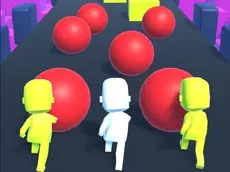
Human Runner 3D
Human Runner 3D is a fast-paced arcade racing game where players navigate through vibrant 3D obstacle courses to reach the finish line in a test of timing.
About Human Runner 3D
Human Runner 3D offers a straightforward yet challenging racing experience built on the Unity 3D engine. Players control a character navigating through various courses filled with moving and stationary hazards. The gameplay focuses heavily on spatial awareness and quick reflexes, requiring players to identify the safest path through barriers that can impede their progress.
This arcade-style title is designed for fans of action and racing who enjoy skill-based movement. With its clean visual style and intuitive keyboard controls, it provides an accessible entry point for players looking for short, intense sessions of competitive running. It particularly suits those who appreciate clear objectives and the satisfaction of mastering a difficult course.
- Genre: Action, 3D
- Platform: Browser
- Mode: Singleplayer
- Developer: Best Games
- Recommended age: 3+
- Mobile support: No
- Release: 04/30/2019
Why players like Human Runner 3D
- Engaging 3D obstacle courses that test reaction times.
- Simple and responsive keyboard-based movement.
- Fast-paced action suitable for quick gaming sessions.
- Clean, colorful visuals that enhance the arcade experience.
Instructions

How to play
Use the arrow keys to guide your character through the 3D environment. The primary objective is to race toward the finish line while navigating around various obstacles. Success depends on timing your movements to avoid contact with hazards that might slow you down. Stay focused on the path ahead and react quickly to changes in the terrain to maintain a competitive pace throughout the course.
Tips for beginners
- Observe the patterns of moving obstacles before attempting to pass them.
- Maintain a steady rhythm to ensure you have enough time to react to upcoming barriers.
- Use precise arrow key taps for better directional control in narrow sections.