Paper Minecraft
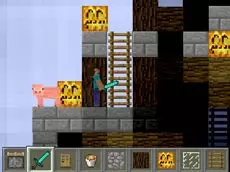
Paper Minecraft brings the iconic sandbox survival and building experience into a 2D side-scrolling format, offering a unique perspective on resource gathering and crafting directly in your browser.
About Paper Minecraft
This 2D adaptation translates core sandbox mechanics into a side-scrolling environment. Players navigate a blocky world where they can mine materials, build structures, and manage an extensive inventory. The game emphasizes exploration and survival, allowing for significant world manipulation and item management within a two-dimensional plane.
The experience focuses on the loop of gathering resources and utilizing a crafting system to create tools and items. Whether you are constructing a secure base or exploring the terrain, the familiar logic of block-based interaction remains central. It provides a lightweight yet detailed alternative for fans of survival-crafting games who prefer a platformer-style layout and accessible browser-based play.
- Genre: Action
- Platform: Browser
- Mode: Singleplayer
- Mobile support: No
- Release: 09/13/2015
Why players like Paper Minecraft
- Faithful 2D recreation of classic sandbox survival mechanics.
- Deep crafting and inventory management systems.
- Ability to save progress and label storage for organized play.
- Creative freedom to modify and build within a side-scrolling world.
Instructions


1...9 = items
E = craft
F = eat
Q = throw
SPACE = split an item
P = pause
T = talk
O = save
N = label a chest
How to play
Navigate the environment using movement keys and use your mouse to interact with the world. Collect resources by mining blocks and open the crafting menu to transform raw materials into tools. Manage your hunger by eating gathered food and organize your inventory using hotkeys. You can label chests to keep your items sorted and use the save function to preserve your progress across sessions.
Tips for beginners
- Use numeric hotkeys to quickly switch between tools and materials while building.
- Organize your storage by labeling chests to find specific resources faster.
- Remember to save your progress frequently using the dedicated save key.
- Split item stacks in your inventory to manage crafting recipes more efficiently.