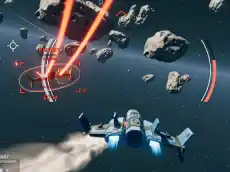
Space Guardian
Space Guardian is an aerial action game where players pilot a craft through space, engaging in shooting combat to defend their territory against incoming threats.
About Space Guardian
Space Guardian places you in the cockpit of a specialized spacecraft designed for high-stakes aerial combat. As a guardian of the stars, your primary objective involves navigating through 3D environments while identifying and neutralizing targets. The game utilizes a combination of keyboard movement and mouse-based aiming, providing a responsive experience for fans of the flying and shooting genres.
The Unity 3D engine ensures smooth flight mechanics and visual clarity, allowing players to focus on their maneuvers and accuracy. This title appeals to those who enjoy arcade-style flight simulators where quick reflexes and steady aim are the keys to maintaining control over the battlefield. It offers a straightforward approach to space combat that is accessible yet challenging.
Why players like Space Guardian
- Responsive flight controls using standard keyboard and mouse inputs.
- Engaging 3D space environments built on the Unity engine.
- Straightforward shooting mechanics focused on precision and timing.
- Fast-paced action suitable for quick, competitive gaming sessions.
Instructions
 TAB
TAB 
How to play
Use the WASD keys to guide your craft through space, adjusting your position to avoid obstacles. Aim using the mouse to track targets and deploy your weapons to clear the area. The Tab key allows you to access secondary menus or game information. Success depends on your ability to balance flight maneuvers with accurate shooting to neutralize threats as they appear.
Tips for beginners
- Keep your craft moving constantly to avoid becoming an easy target for enemies.
- Use the mouse for fine aiming adjustments while steering with the keyboard.
- Familiarize yourself with the Tab key function early to monitor your progress or settings.
- Focus on one target at a time to clear the screen more efficiently.