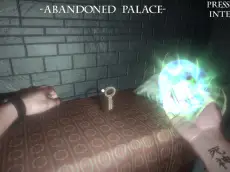
House of horror 2
House of Horror 2 delivers a suspenseful atmospheric experience where players explore eerie environments and interact with objects to uncover the secrets hidden within a haunted 3D setting.
About House of horror 2
This sequel continues the series' focus on atmospheric horror, placing players in a detailed 3D environment designed to build tension. Using first-person navigation, you must move through dimly lit corridors and rooms, relying on observation and interaction to progress. The game emphasizes a sense of unease rather than fast-paced combat, making it a solid choice for fans of casual yet scary browser-based experiences.
Developed by EnroGame, the title utilizes the Unity engine to provide a smooth visual experience on desktop browsers. It caters to players who enjoy slow-burn suspense and environmental exploration. Whether you are investigating strange occurrences or simply trying to find your way through the darkness, the game maintains a consistent level of dread as you move through the haunted house.
Why players like House of horror 2
- Immersive 3D environments that enhance the scary atmosphere.
- Simple, intuitive controls that allow for easy navigation.
- Focus on interaction and environmental discovery over complex mechanics.
- Smooth performance on WebGL-compatible desktop browsers.
Instructions


E = interaction
Q = spawn point
SPACESHIFT
How to play
Navigate the environment using your keyboard for movement and the mouse to look around. Focus on exploring every corner of the map to find interactive objects. Press the interaction key when near items to trigger events or gather information. If you find yourself lost or stuck, utilize the spawn point mechanic to reset your position and approach the situation from a fresh perspective.
Tips for beginners
- Pay close attention to visual cues in the environment that signal interactive objects.
- Use the sprint function to move quickly through areas you have already explored.
- Investigate every room thoroughly, as important details are often hidden in the shadows.
- Listen for subtle audio cues that can help you anticipate upcoming events.