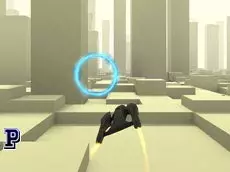
Army Pilot
Master the art of military aviation in Army Pilot, a 3D flying simulator that challenges players to navigate aircraft through specialized courses using precise keyboard controls.
About Army Pilot
Army Pilot offers a focused 3D flight experience designed for players who enjoy military-themed aviation. Developed by Faramel Games, this title emphasizes steady progression and spatial awareness as you guide your aircraft through the air. The 3D environment provides a sense of depth and scale, making every maneuver feel significant as you work through the available stages and refine your aerial skills.
The game suits those looking for a straightforward yet engaging flying simulation. By focusing on keyboard-based navigation, it rewards steady hands and careful adjustments. As a WebGL-based title, it delivers smooth performance directly in your browser, allowing for quick sessions where you can track your progress through the various flight challenges provided.
- Genre: Driving, 3D
- Platform: Browser
- Mode: Singleplayer
- Developer: Faramel Games
- Mobile support: No
- Release: 09/28/2016
Why players like Army Pilot
- Intuitive 3D flight mechanics using standard keyboard inputs.
- Military-themed aesthetic that appeals to aviation enthusiasts.
- Clear progression system that tracks player advancement across levels.
- Accessible browser-based performance powered by Unity 3D.
Instructions

SPACE = pause
How to play
Use the arrow keys to navigate your aircraft through the 3D environment. Focus on maintaining a stable flight path while completing the objectives set within each level. If you need to step away or plan your next move, use the space bar to pause the action. Success depends on your ability to manage the plane's altitude and direction effectively to reach the end of the course.
Tips for beginners
- Make small, incremental adjustments with the arrow keys to avoid oversteering your aircraft.
- Monitor your surroundings carefully to stay within the designated flight area and avoid obstacles.
- Use the pause function if you need a moment to assess the path ahead or adjust your strategy.