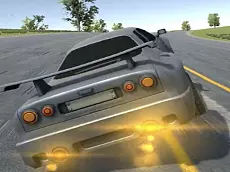
Cars Drift Masters
Experience a high-fidelity car simulator focused on drifting mechanics, offering various vehicles and a police-themed environment for players who enjoy technical driving and vehicle control.
About Cars Drift Masters
Cars Drift Masters is a 3D driving simulator built on the Unity engine, focusing on the mechanics of vehicle handling and controlled sliding. Players can explore the environment using a variety of vehicles, including standard cars and trucks. The inclusion of police-themed elements and signaling options like winkers adds a layer of realism to the simulation, catering to enthusiasts who appreciate detailed vehicle interactions.
The game emphasizes skill-based driving rather than simple racing. By utilizing different camera perspectives and rear-view options, players can better manage their positioning while navigating corners. Whether you are practicing precise drifts or simply exploring the map, the simulation provides a platform to test your coordination and mastery over various automotive physics.
Why players like Cars Drift Masters
- Realistic vehicle simulation with a dedicated focus on drifting mechanics.
- Diverse vehicle selection including trucks and police-themed cars.
- Multiple camera angles and look-behind features for better spatial awareness.
- Detailed signaling controls that enhance the simulation experience.
Instructions

C = camera
QE = winkers
B = look behind
How to play
Navigate the environment using the arrow keys to control your vehicle's movement. Focus on maintaining control during turns to initiate and sustain drifts. Use the camera toggle to find the best view for your driving style, and utilize the look-behind function to stay aware of your surroundings. Signaling with winkers allows for more immersive role-play or technical maneuvers within the simulator's space.
Tips for beginners
- Switch camera views to find the most comfortable perspective for navigating tight corners.
- Use the look-behind key frequently to avoid obstacles while reversing or adjusting your drift.
- Practice throttle control with the arrow keys to maintain a steady angle during long slides.
- Utilize the winker keys when navigating intersections to enhance the realism of your driving.