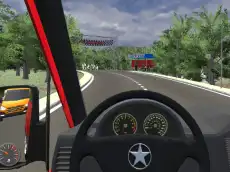
City Minibus Driver
Take the wheel of a public transport vehicle in City Minibus Driver, a detailed 3D simulation where you navigate urban streets alone or with a friend.
About City Minibus Driver
City Minibus Driver offers a specialized driving experience focused on handling larger vehicles within a busy metropolitan environment. As a simulator, it emphasizes precision and control, tasking players with managing the unique physics of a minibus while navigating through city layouts. The game blends elements of racing and parking, providing a varied experience for those who enjoy technical driving challenges across different urban scenarios.
The inclusion of a dedicated 2-player mode allows for shared sessions on a single keyboard, making it a practical choice for local cooperative or competitive play. With features like vehicle upgrades and multiple camera angles, the game provides a sense of progression and immersion. Whether you are practicing your parking skills or racing through the streets, the 3D visuals and responsive controls create an engaging urban driving atmosphere.
- Genre: Driving, 3D
- Platform: Browser
- Mode: Singleplayer
- Developer: RHM Interactive
- Recommended age: 3+
- Mobile support: No
- Release: 07/21/2021
Why players like City Minibus Driver
- Supports local 2-player mode for shared gameplay on one screen.
- Combines different driving disciplines like parking and racing.
- Features a vehicle upgrade system to improve minibus performance.
- Multiple camera perspectives enhance the simulation experience.
Instructions
PLAYER 1

B = Look back
R = restart
SPACE = handbrake
123 = Horn
C = camera
PLAYER 2

B = look back
O = restart
right SHIFT= handbrake
How to play
Navigate your minibus through the city using the keyboard controls. You can choose to drive solo or compete with a friend in 2-player mode. Use the steering and acceleration keys to move, and apply the handbrake for sharp turns or precise stops. Switch between camera views to better judge distances when parking, and use the horn to interact with the environment. Focus on completing specific tasks while managing the vehicle's momentum.
Tips for beginners
- Use the 'look back' function frequently to avoid collisions while reversing or changing lanes.
- Switch camera angles when attempting difficult parking maneuvers to get a better sense of your vehicle's size.
- Utilize the handbrake during races to maintain speed while navigating tight city corners.
- Experiment with the different horn sounds to add a touch of realism to your driving simulation.