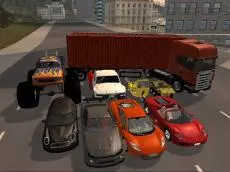
City Rider 3D
City Rider 3D offers a detailed urban driving simulation where players can explore city streets, switch between various vehicle types, and experiment with realistic car handling mechanics.
About City Rider 3D
This 3D driving simulator focuses on the technical aspects of vehicle operation within an open city environment. Players can navigate through streets using a variety of vehicles, ranging from standard cars to heavy-duty monster trucks. The game emphasizes a realistic approach to driving, incorporating manual controls such as a clutch and gearbox for those seeking a more complex and engaging experience.
The core appeal lies in the freedom to experiment with different driving styles and vehicle setups. Whether you want to cruise the city in a sedan or test the suspension of a monster truck, the game provides tools to adjust your interaction with the vehicle. It suits players who enjoy technical simulators and the ability to customize their driving physics on the fly.
Why players like City Rider 3D
- Diverse vehicle selection including monster trucks.
- Detailed manual control options like clutch and ignition.
- Adjustable vehicle setup parameters for custom handling.
- Open 3D city environment for free-roam exploration.
Instructions
OP = change car
 = move
SPACE = handbrake
C = change camera
B = setup window
FV = gear box
X = clutch
ESC = restart game
R = reset car
SHIFT+R = repair car
I = ignition
How to play
Begin by starting the engine using the ignition key. Use the arrow keys to navigate the city streets. You can switch between different vehicles instantly to test how they handle. For a more authentic simulation, manage the gear box and clutch manually. If the vehicle sustains damage or becomes stuck, use the repair and reset functions to continue driving without restarting the entire session.
Tips for beginners
- Use the setup window to fine-tune vehicle behavior to your driving preference.
- Switch camera angles to find the best perspective for navigating tight turns.
- The handbrake is essential for performing controlled drifts or stopping quickly.
- Remember to engage the ignition if the car stalls or after performing a reset.