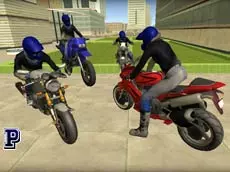
Moto Rider 3D
Experience realistic motorcycle simulation in Moto Rider 3D, where you can switch between different bikes and explore environments using a variety of camera perspectives and high-speed maneuvers.
About Moto Rider 3D
Moto Rider 3D is a motorcycle simulator built with Unity 3D that focuses on the sensation of riding across open environments. Players can choose from several different bikes, each offering a distinct visual style and handling profile. The inclusion of various camera views, including a first-person perspective, allows for a more immersive driving experience, whether you are cruising at a steady pace or testing the limits of your vehicle.
The game emphasizes freedom and experimentation rather than strict racing objectives. With features like a turbo boost for sudden bursts of speed and police lights for roleplay elements, it caters to fans of casual driving simulators. The mechanics are straightforward, making it accessible for players who enjoy exploring 3D spaces on two wheels without the pressure of a ticking clock.
- Genre: Driving, 3D
- Platform: Browser
- Mode: Singleplayer
- Developer: Faramel Games
- Mobile support: No
- Release: 01/17/2018
Why players like Moto Rider 3D
- Switch between four different motorcycles instantly during gameplay.
- Multiple camera angles provide both immersive and tactical views.
- Turbo mechanics allow for high-speed exploration across the map.
- Relaxed simulation gameplay with no strict time limits or complex rules.
Instructions
 = ride
1234 = change bike
ESC = pause
SHIFT = turbo
C = change view
SPACE = handbrake
R = reset game
G = reset bike
E = police lights
H = hide instructions
How to play
Navigate your motorcycle using the arrow keys to accelerate, steer, and brake. Use the number keys to swap your bike on the fly and find the ride that suits your style. If you need a quick speed increase, activate the turbo with the shift key. Use the handbrake for sharper turns or quick stops, and cycle through camera perspectives to find your preferred view of the road.
Tips for beginners
- Use the turbo boost on straight sections to cover ground quickly.
- Experiment with different camera views to improve your awareness of the terrain.
- If your bike becomes stuck or flipped, use the reset keys to return to the road.
- Test the handbrake to master tighter turns at higher speeds.