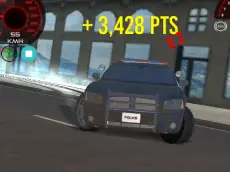
Police Drift & Stunt
Take control of a police vehicle in this 3D driving simulator where you can perform high-speed drifts and stunts across an open environment using nitro and slow-motion effects.
About Police Drift & Stunt
Police Drift & Stunt offers a 3D driving experience focused on vehicle handling and precision movement. Unlike traditional racing titles, this game emphasizes the mechanics of drifting and performing maneuvers within a specialized police car. The inclusion of various camera angles allows players to view their driving from multiple perspectives, enhancing the sense of speed and control as they navigate the terrain.
The gameplay is designed for fans of sandbox-style driving who enjoy testing a vehicle's limits. With features like nitro for sudden bursts of speed and a slow-motion toggle for precise adjustments, it caters to players looking for a mix of fast-paced action and technical finesse. Its accessible controls and focus on stunt-based driving make it a solid choice for anyone seeking casual yet engaging automotive simulation.
Why players like Police Drift & Stunt
- Engaging drifting mechanics in a 3D environment.
- Unique slow-motion feature for cinematic stunt control.
- Nitro boosts for rapid acceleration and momentum.
- Multiple camera perspectives to suit different driving styles.
- Open-ended gameplay focused on driving freedom.
Instructions

F = nitro
G = slow motion
C = camera
How to play
Navigate your police car through the environment using the keyboard for steering and acceleration. Use the nitro boost to gain speed before hitting ramps or entering long drifts. If you need to make precise adjustments during a complex maneuver, activate the slow-motion mode to better visualize your car's trajectory. Switch between different camera views to find the most comfortable perspective for drifting or exploring the area.
Tips for beginners
- Use nitro just before a drift to maintain high momentum through the turn.
- Activate slow motion during mid-air stunts to ensure a clean landing.
- Switch camera views frequently to get a better sense of your surroundings.
- Feather the steering keys to maintain a controlled slide without spinning out.