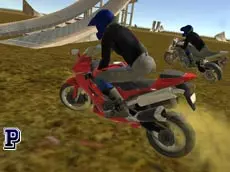
Real Moto Stunts Challenge
Real Moto Stunts Challenge offers a high-speed motorcycle simulation where players can perform stunts, switch between different bikes, and explore 3D environments using turbo boosts and realistic handling.
About Real Moto Stunts Challenge
This 3D motorcycle simulator focuses on the thrill of high-speed riding and technical maneuvering. Developed by Faramel Games, the title provides players with a selection of bikes that can be swapped instantly during gameplay. The inclusion of features like police lights and multiple camera perspectives enhances the immersive feel of navigating the various stunt-filled terrains.
The gameplay centers on mastering physics-based movement and utilizing turbo boosts for maximum momentum. With dedicated controls for handbraking and resetting, the game caters to players who enjoy testing the limits of virtual motorbikes. It is an ideal choice for fans of driving simulators looking for a straightforward yet responsive 3D environment to practice aerial rotations and precision landings.
- Genre: Driving, 3D
- Platform: Browser
- Mode: Singleplayer
- Developer: Faramel Games
- Mobile support: No
- Release: 01/24/2018
Why players like Real Moto Stunts Challenge
- Instant bike swapping allows for quick variety during play.
- Responsive turbo mechanics for high-speed jumps and stunts.
- Multiple camera views provide different perspectives on the action.
- Dedicated reset functions ensure minimal downtime after crashes.
Instructions
 = ride
1234 = change bike
ESC = pause
SHIFT = turbo
C = change view
SPACE = handbrake
R = reset game
G = reset bike
E = police lights
H = hide instructions
How to play
Use the arrow keys to navigate your motorcycle through the 3D environment. Activate the turbo with the shift key to gain the speed necessary for clearing gaps or performing stunts. If you lose control, the handbrake helps with tight turns, while the reset keys allow you to quickly recover your position. You can switch between different bikes at any time using the number keys to see which model handles the terrain best.
Tips for beginners
- Cycle camera views with the C key to find the best angle for landing difficult jumps.
- Apply the handbrake during sharp turns to maintain control without losing too much momentum.
- Save your turbo for straight sections or just before reaching a ramp for maximum airtime.
- Experiment with all four bike models to find the one that fits your specific riding style.