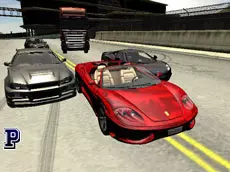
Valley Rider
Valley Rider offers a detailed 3D driving experience where you can explore landscapes, customize car setups, and switch between various vehicles to test their handling on the road.
About Valley Rider
Valley Rider is a 3D driving simulator that focuses on the mechanics of vehicle handling and exploration. Built with Unity 3D, the game allows players to navigate through environments while experimenting with different car and truck models. The inclusion of technical settings like wheel dynamics and car setups provides a deeper look into how various adjustments affect the driving experience.
Whether you are testing the responsiveness of a handbrake turn or toggling between different camera perspectives, the game emphasizes control and customization. It is designed for players who enjoy technical driving details and the freedom to swap vehicles on the fly, offering a sandbox-style approach to road exploration and vehicle testing.
Why players like Valley Rider
- Switch between different cars and trucks instantly during gameplay.
- Adjustable car setups and wheel dynamics for a customized drive.
- Multiple camera angles to change the perspective of the journey.
- Detailed 3D environments suitable for testing vehicle limits.
Instructions
 = ride
C = change camera
R = restart car
SPACE = hand brake
B = car setup
OP = change car
H = hide gauge
G = wheel dynamics
 = select a car setup
How to play
Use the arrow keys to navigate your vehicle through the valley. You can change your car at any time using the O and P keys to find a model that fits your preference. If you want to fine-tune the performance, open the car setup menu with the B key and use your mouse to select specific configurations. The space bar acts as your hand brake for tighter maneuvers or sudden stops.
Tips for beginners
- Use the restart key if your vehicle gets stuck or flips during exploration.
- Experiment with wheel dynamics to see how different settings change the steering feel.
- Toggle the gauge visibility to clear the screen for a more immersive view.
- Try different camera angles to get a better sense of the vehicle's position on the road.