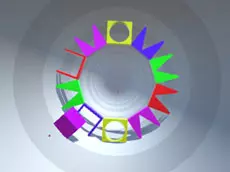
Shape Tunnel
Shape Tunnel is a fast-paced 3D skill game where players navigate through a shifting corridor, testing their reflexes and spatial logic to avoid obstacles using keyboard controls.
About Shape Tunnel
Shape Tunnel offers a minimalist yet challenging 3D experience centered on movement and precision. As you travel through a continuous tunnel, the environment presents various geometric hurdles that require quick thinking and steady hands. The game blends elements of logic and skill, forcing players to anticipate changes in the path while maintaining a high level of focus on the road ahead.
Developed by FreezeNova, this title is ideal for those who enjoy arcade-style gameplay with a puzzle twist. Its clean visual style and straightforward mechanics make it accessible to players of all ages, yet the increasing difficulty provides a satisfying test for seasoned gamers. It is a pure test of reaction time and spatial awareness within a stylized digital landscape.
- Genre: Logic, 3D
- Platform: Browser
- Mode: Singleplayer
- Developer: FreezeNova
- Recommended age: 3+
- Mobile support: No
- Release: 04/26/2019
Why players like Shape Tunnel
- Fast-paced 3D gameplay that demands constant attention.
- Simple left and right controls that are easy to learn but hard to master.
- Clean, geometric visual design that minimizes distractions.
- A challenging progression that tests both reflexes and spatial logic.
Instructions
←→
How to play
Use the left and right keyboard keys to navigate through the 3D tunnel environment. Your primary objective is to move through the shifting path while avoiding or interacting with the geometric shapes presented. Success requires quick reactions and the ability to process spatial puzzles in real-time. As you move forward, you must stay focused on the changing layout to maintain your momentum and survive for as long as possible.
Tips for beginners
- Look as far ahead as possible to anticipate the next set of obstacles early.
- Use short, precise taps on the keyboard keys rather than holding them down to maintain better control.
- Stay focused on the center of the screen to better gauge the distance and orientation of incoming shapes.