- Games
- Multiplayer
- Blocky Combat Swat - Killing Zombie
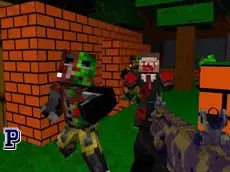
Blocky Combat Swat - Killing Zombie
Blocky Combat Swat - Killing Zombie is a block-style multiplayer FPS where players engage in action-packed shooting matches featuring various weapons and a distinct Minecraft-inspired visual aesthetic.
About Blocky Combat Swat - Killing Zombie
This 3D action title combines the familiar aesthetic of block-based worlds with the fast-paced mechanics of a first-person shooter. Developed by Mentolatux, the game focuses on multiplayer combat, allowing players to navigate environments while utilizing an arsenal of firearms. Its visual style draws inspiration from popular voxel-based builders, creating a recognizable backdrop for competitive shooting matches.
Players can switch between different weapons on the fly and utilize tactical movements like crouching and sprinting to gain an advantage. The inclusion of grenades and interactive elements adds depth to the basic shooting loop. Whether you are a fan of FPS mechanics or enjoy the blocky art style, this game offers a straightforward and accessible multiplayer experience directly in your browser.
- Genre: Multiplayer, 3D, Action
- Platform: Browser
- Mode: Multiplayer
- Developer: Mentolatux
- Mobile support: No
- Release: 08/30/2017
Why players like Blocky Combat Swat - Killing Zombie
- Fast-paced multiplayer shooting action
- Familiar block-style 3D graphics
- Variety of weapons and tactical movement options
- Accessible browser-based gameplay with no download required
Instructions


TAB = pause
123 = weapons
G = grenade
E = interaction
R = reload
C = crouch
SHIFT = run
SPACE = jump
ENTER = chat
How to play
Use WASD to move through the environment and the mouse to aim and fire your weapon. Switch between your primary and secondary weapons using the number keys to adapt to different combat ranges. Utilize the shift key to sprint across open areas and the space bar to jump over obstacles. Press E to interact with objects and G to deploy grenades during intense encounters.
Tips for beginners
- Reload your weapon during quiet moments using the R key to ensure you are ready for the next encounter.
- Use the crouch button to reduce your profile and make it harder for opponents to hit you.
- Keep an eye on the chat to coordinate with other players in the multiplayer environment.