- Games
- Multiplayer
- Dinosaur Simulator 2 Dino City
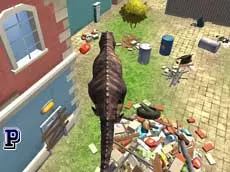
Dinosaur Simulator 2 Dino City
Experience the thrill of roaming a 3D urban environment as a powerful dinosaur in this multiplayer simulator where action and progression meet in a chaotic city setting.
About Dinosaur Simulator 2 Dino City
Dinosaur Simulator 2 Dino City places you in control of a prehistoric creature within a modern urban landscape. This 3D action simulator allows players to navigate streets and interact with the environment through a series of attacks. The multiplayer aspect introduces a social or competitive layer, as you encounter others while exploring the city's layout and testing your dinosaur's capabilities.
Focusing on progression and animal-based gameplay, the title provides a straightforward simulation experience. It suits players who enjoy free-roaming mechanics and the novelty of seeing ancient reptiles in a contemporary world. The WebGL-based graphics offer a clear perspective on the scale of the dinosaur compared to the surrounding structures, emphasizing the core theme of city-wide disruption and survival.
- Genre: Multiplayer, 3D, Action
- Platform: Browser
- Mode: Multiplayer
- Developer: Martin
- Mobile support: No
- Release: 10/26/2017
Why players like Dinosaur Simulator 2 Dino City
- Interactive 3D city environment designed for exploration.
- Multiplayer connectivity with other players in real-time.
- Satisfying progression-based gameplay mechanics.
- Simple and responsive keyboard control scheme.
Instructions
 = move
SPACE = attack
ESC = pause
How to play
Use the WASD keys to navigate your dinosaur through the city streets and around obstacles. When you find targets or objects, press the space bar to perform an attack. The goal is to progress through the game by interacting with the environment and managing your dinosaur's actions. If you need to stop or adjust settings, use the escape key to bring up the pause menu.
Tips for beginners
- Explore different areas of the city to find new interaction points.
- Use the attack button near various structures to see how the environment reacts.
- Keep an eye on other players in the multiplayer space to coordinate your movements.
- Utilize the pause menu if you need to check your surroundings without active movement.