- Games
- Multiplayer
- Shure Shot
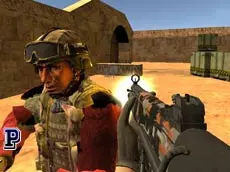
Shure Shot
Shure Shot is a fast-paced 3D multiplayer first-person shooter where players engage in competitive gunfights across various environments, testing their reflexes and accuracy against opponents online.
About Shure Shot
Shure Shot delivers a classic first-person shooter experience directly in the browser, focusing on fluid movement and responsive combat. As a multiplayer title, it emphasizes direct competition, requiring players to navigate 3D environments while managing a diverse arsenal of weapons. The inclusion of traditional mechanics like crouching, sprinting, and environmental interactions ensures a familiar yet engaging tactical layer for fans of the genre.
The game is designed for players who appreciate the immediacy of WebGL shooters. With its straightforward controls and focus on skill-based gunplay, it provides an accessible platform for quick matches or longer competitive sessions. Whether you are maneuvering through tight corners or engaging in long-range shootouts, the emphasis remains on precision and quick decision-making in a live multiplayer setting.
- Genre: Multiplayer, 3D, Action
- Platform: Browser
- Mode: Multiplayer
- Developer: oneru220
- Mobile support: No
- Release: 06/08/2017
Why players like Shure Shot
- Fast-paced multiplayer combat against real opponents.
- Responsive first-person shooter mechanics and movement.
- Diverse weapon selection accessible via quick hotkeys.
- Smooth 3D graphics powered by the Unity engine.
Instructions


ESC = menu
1...4 = weapons
C = crouch
R = reload
SHIFT = run
F = interaction
E = pick-up
SPACE = jump
ENTER = chat
How to play
Navigate the environment using the WASD keys and aim your weapon with the mouse. You can switch between different weapons using the number keys 1 through 4 to adapt to various combat situations. Use the shift key to run for better positioning and the space bar to jump over obstacles. Interact with items or pick up new equipment using the F and E keys while staying alert for enemy movement.
Tips for beginners
- Reload your weapon during quiet moments to ensure you are ready for the next encounter.
- Use the crouch key to reduce your profile and potentially improve your stability during a firefight.
- Keep an eye on the chat to communicate or coordinate with other players in the match.
- Experiment with all four weapon slots to find the best tool for different engagement ranges.