Mini Farm
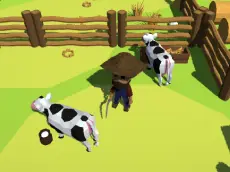
Mini Farm is a 3D strategy game where players manage rural life and explore their surroundings, using precise movement and camera controls to build a thriving homestead.
About Mini Farm
This title brings a strategic layer to the farming genre, utilizing a full 3D environment. Players navigate their character through the farm, interacting with various elements and managing resources to ensure steady growth. Unlike static simulations, this game encourages active movement and environmental interaction, providing a more hands-on approach to agricultural management and exploration.
The gameplay experience is defined by its perspective control and tactical actions. With the ability to rotate the view and move freely, players can efficiently oversee their land and animals, including horses. It is suitable for those who appreciate a mix of creative building and light action, offering a satisfying sense of progression within a clean, stylized world.
- Genre: Strategy
- Platform: Browser
- Mode: Singleplayer
- Recommended age: 7+
- Mobile support: No
- Release: 06/30/2021
Why players like Mini Farm
- Strategic depth in farm management and resource planning
- Full 3D perspective with adjustable camera angles for better visibility
- Active character movement that goes beyond simple clicking
- Clean and responsive Unity-based visuals
Instructions


SHIFT = attack
QE = camera
How to play
Move your character using the WASD keys to reach different areas of your farm. Use the mouse for selection and interaction while adjusting your view with the Q and E keys. When necessary, use the Shift key to perform attack actions to clear obstacles or interact with specific objects. Efficiently managing your movement between different tasks is key to expanding your farm's reach.
Tips for beginners
- Adjust the camera frequently to maintain a clear overview of your entire property.
- Use the attack action to quickly clear away any obstructions in your path.
- Plan your movement routes to save time when checking on animals or crops.
- Combine mouse interactions with keyboard movement for the most efficient workflow.