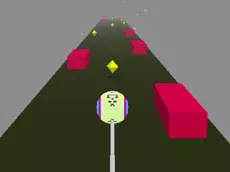
Speed Ball
Speed Ball is a fast-paced arcade game where players navigate a rolling sphere through challenging environments, testing reflexes and precision in a high-speed race for distance.
About Speed Ball
Speed Ball places you in control of a sphere moving at high velocities across dynamic platforms. As part of the slope games genre, the gameplay emphasizes momentum and quick reactions. Players must stay on the path while dealing with increasing speed and narrow passages, making it an ideal choice for fans of skill-based arcade challenges that require constant focus.
The game focuses on progression and range, challenging players to see how far they can travel without falling or hitting obstacles. Its clean Unity 3D visuals provide a smooth experience that keeps the focus entirely on the movement. It is best suited for players who enjoy high-stakes reaction games that reward steady hand-eye coordination and the pursuit of a new personal best.
- Genre: Action
- Platform: Browser
- Mode: Singleplayer
- Mobile support: No
- Release: 12/09/2018
Why players like Speed Ball
- Fast-paced arcade physics that reward quick reflexes.
- Challenging slope-style level design that keeps gameplay intense.
- Smooth 3D graphics that enhance the sense of speed.
- Straightforward mechanics focused on progression and high scores.
Instructions

How to play
Use the arrow keys to guide the ball across the platforms. The primary objective is to maintain your balance and stay on the course as the speed naturally increases. Navigate through narrow sections and adjust your trajectory carefully to avoid falling off the edges. Success depends on making small, precise adjustments rather than oversteering, especially as the momentum builds during your run.
Tips for beginners
- Use slight taps on the arrow keys for better control at high speeds.
- Look ahead at the upcoming path to anticipate turns and narrow gaps.
- Try to stay centered on the platforms to maximize your room for error.