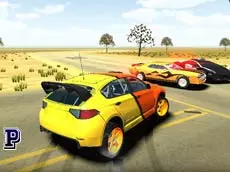
3D Car Simulator
Experience a high-speed driving simulation where you can switch between different vehicles and test their handling across an open 3D environment using realistic keyboard controls.
About 3D Car Simulator
3D Car Simulator offers a straightforward driving experience focused on vehicle physics and exploration. Players can choose from a selection of vehicles, including a police cruiser, and navigate through a three-dimensional landscape. The game emphasizes the tactile feel of driving, allowing for manual gear shifting and high-speed maneuvers using a turbo boost for an added sense of momentum.
This simulator is designed for fans of sandbox driving who enjoy testing the limits of different car types without strict mission constraints. Whether you are practicing precise cornering with the handbrake or simply cruising through the environment, the ability to switch cars and camera angles instantly provides a versatile playground for automotive enthusiasts.
- Genre: Driving, 3D
- Platform: Browser
- Mode: Singleplayer
- Developer: Faramel Games
- Mobile support: No
- Release: 09/12/2016
Why players like 3D Car Simulator
- Switch between multiple unique vehicles on the fly.
- Realistic driving features including manual gear shifting and turbo.
- Multiple camera perspectives for varied driving experiences.
- Functional police lights and siren effects on specific cars.
Instructions
 = ride
ESC = back to menu
123 = change car
SHIFT = turbo
C = change view
SPACE = handbrake
R = reset game
G = reset car
E = police lights
H = hide instructions
PGUP/PGDN = change gear
How to play
Start by selecting your preferred vehicle using the number keys. Use the arrow keys to accelerate and steer through the environment. For more control over your speed, use the Page Up and Page Down keys to shift gears manually. The spacebar acts as your handbrake for sharp turns, while the shift key provides a turbo boost. You can toggle camera views or reset your position if you get stuck.
Tips for beginners
- Use the turbo boost on long straightaways to reach maximum velocity quickly.
- Master the handbrake to execute tighter turns and controlled slides.
- Experiment with different camera angles to find the best view for high-speed navigation.
- Switch cars instantly to see how different vehicle weights and speeds affect handling.