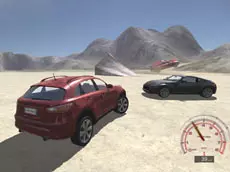
Derby Crash
Experience realistic vehicle physics and high-performance driving in Derby Crash, a 3D simulator where you can push powerful cars to their limits across an open, stunt-filled landscape.
About Derby Crash
Derby Crash is a 3D driving simulator that emphasizes technical vehicle physics and realistic damage modeling. Players can select from various high-performance vehicles and explore an expansive environment designed for testing speed, handling, and durability. The game focuses on the sensation of driving, offering a sandbox experience where you can experiment with car mechanics without the constraints of traditional racing rules.
The appeal lies in the technical detail of the simulation. With features like real-time car deformation and an instant repair system, it caters to fans of automotive engineering and stunt driving. It is an ideal choice for players who enjoy free-form exploration and testing the physical limits of different vehicles in a detailed 3D environment.
Why players like Derby Crash
- Realistic 3D vehicle physics and car deformation.
- Open-world environment for unrestricted driving exploration.
- Slow-motion mode for observing crashes and stunts in detail.
- Instant repair mechanic to keep the action moving.
- Multiple camera angles to suit different driving styles.
Instructions
 = drive
SPACE = handbrake
C = camera
ENTER = reset car
T = slow mode
R = repair car
How to play
Use the WASD keys to accelerate and steer your vehicle through the environment. The spacebar acts as a handbrake for sharp turns or drifting. If your car sustains too much damage or flips over, use the repair and reset functions to restore it to its original state. You can toggle different camera views to find the best perspective for driving or performing stunts across the map.
Tips for beginners
- Activate slow-motion mode to precisely time jumps or analyze vehicle impacts.
- Engage the handbrake during high-speed turns to initiate controlled drifts.
- Switch camera views frequently to navigate difficult terrain more effectively.
- Reset your car immediately if you become stuck to maintain your momentum.