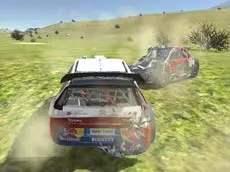
Derby Crash 3
Derby Crash 3 delivers a high-fidelity 3D driving simulation where players can push vehicles to their limits, perform drifts, and explore detailed environments with realistic physics.
About Derby Crash 3
This third entry in the Derby Crash series continues the focus on open-world driving and vehicular physics. As a 3D simulator, it allows for a high degree of freedom, letting players navigate terrain while testing the structural limits of their cars. The inclusion of a repair feature ensures that the action remains continuous, even after significant impacts or stunts.
The game caters to fans of technical driving and drifting. With multiple camera angles and a slow-motion toggle, players can analyze their maneuvers or appreciate the mechanical details of the simulation. It is a sandbox-style experience designed for those who enjoy the nuances of car handling and the visual feedback of a robust physics engine.
Why players like Derby Crash 3
- Realistic 3D vehicle physics and deformation
- Freedom to explore and drive without strict race constraints
- Instant repair and reset functions for uninterrupted gameplay
- Slow-motion mode for capturing precise stunts and crashes
Instructions
 = drive
SPACE = handbrake
C = camera
ENTER = reset car
T = slow mode
R = repair car
How to play
Navigate the environment using the keyboard to accelerate, steer, and brake. Utilize the handbrake for tighter turns and initiating drifts. If your vehicle becomes too damaged to drive or gets stuck, use the repair and reset keys to quickly return to the action. Experiment with different camera perspectives to find the best view for your driving style and use the slow-motion feature to observe physics in detail.
Tips for beginners
- Use the handbrake during high-speed turns to maintain momentum while drifting.
- Switch camera views frequently to better navigate tight spaces or uneven terrain.
- Activate slow-motion during jumps to see exactly how the car reacts to the environment.
- Don't hesitate to use the repair key to fix cosmetic or functional damage instantly.