Scrap GL
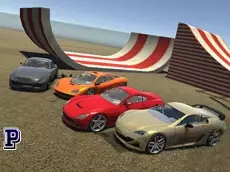
Scrap GL is a 3D multiplayer car simulator where players can drive freely and manipulate obstacles to create their own custom environments for high-speed stunts and exploration.
About Scrap GL
Scrap GL offers a sandbox driving experience that emphasizes creative freedom and technical vehicle control. Unlike traditional racing games, it focuses on the interaction between the driver and the environment. Players can explore detailed 3D maps while using a variety of tools to place or remove obstacles, effectively building their own stunt courses or obstacle tracks on the fly.
The inclusion of multiplayer features allows for a shared experience where users can communicate via chat and see how others navigate the terrain. With simulation-grade controls like manual ignition and a clutch system, the game appeals to players who enjoy a more realistic feel to their driving and the ability to customize the world around them in real-time.
- Genre: Driving, 3D, Multiplayer
- Platform: Browser
- Mode: Multiplayer
- Developer: Ciorbyn
- Mobile support: No
- Release: 09/25/2016
Why players like Scrap GL
- Interactive environment manipulation allows for creative obstacle placement.
- Multiplayer connectivity featuring real-time chat and a player list.
- Advanced driving mechanics including manual engine ignition and clutch controls.
- Multiple camera perspectives to suit different driving and building styles.
Instructions

 = work with obstacles
1...5 = views
TAB = players
DEL = remove an obstacle
SHIFT = clutch
SPACE = handbrake
I = ignition
ENTER = chat
TAB = player list
I = engine on / off
How to play
Start by turning on the engine using the ignition key. Navigate your vehicle using the arrow keys, utilizing the handbrake and clutch for precise maneuvers. You can interact with the environment by placing or removing obstacles with your mouse and the delete key. Switch between different camera views to find the best angle for driving or building, and use the chat function to coordinate with other players in the session.
Tips for beginners
- Always remember to toggle the ignition on before attempting to accelerate.
- Use the handbrake for tighter turns or when you need to stop quickly near obstacles.
- Cycle through the five available camera views to get the best perspective for placing objects.
- Use the player list to keep track of who is currently active in your multiplayer room.