Next Drive 2
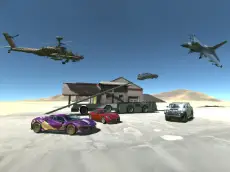
Next Drive 2 is a versatile driving simulator where you can transition from land to air, offering a sandbox experience for players who enjoy vehicle variety and flight mechanics.
About Next Drive 2
Next Drive 2 expands on the traditional driving simulator by incorporating aerial mechanics, allowing players to switch between ground-based vehicles and flight. This Unity 3D title focuses on freedom and experimentation, providing a physics-based environment where you can test the limits of different transportation modes. Whether you are navigating roads or taking to the skies, the game emphasizes control and mechanical interaction.
The inclusion of a repair system and time-manipulation features makes it a forgiving yet technical experience. It caters to players who enjoy exploring open spaces and mastering complex control schemes. With a focus on simulation rather than rigid objectives, it provides a digital playground for those who appreciate the nuances of vehicle handling across multiple terrains.
Why players like Next Drive 2
- Seamless transition between driving and flying modes.
- Detailed physics simulation for ground and air travel.
- Time-slowing feature for precise maneuvering or stunts.
- Quick repair and reset functions to keep the action moving.
Instructions

C = camera / power
SHIFTCTRLCSPACE = power to fly
ENTER = resert car
T = slow time
SPACE = handbrake

R = repair
How to play
Use the WASD keys to navigate your vehicle on the ground. When you are ready for takeoff, use the specific key combinations involving Shift, Ctrl, and Space to gain the power needed for flight. You can adjust your perspective with the camera controls and use the handbrake for tight turns. If your vehicle sustains damage during a landing or high-speed maneuver, use the repair key to fix it instantly.
Tips for beginners
- Use the slow-time feature to navigate difficult terrain or line up a perfect landing.
- Keep track of your camera angles to better judge the distance between your vehicle and the ground.
- If you get stuck or flip over, use the reset function to return to a neutral position quickly.