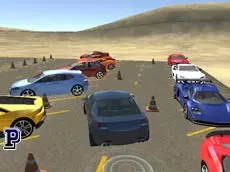
Car Parking: Real 3D Simulator
Test your driving precision in Car Parking: Real 3D Simulator, a challenging title where careful maneuvering and spatial awareness are essential for mastering tight parking spots.
About Car Parking: Real 3D Simulator
Car Parking: Real 3D Simulator focuses on the technical aspects of driving, requiring players to navigate a vehicle through various environments to reach designated spots. Unlike high-speed racing games, this simulator emphasizes control, patience, and the ability to handle a car in confined spaces. The 3D perspective allows for a realistic sense of depth, which is crucial when judging distances between your vehicle and obstacles.
The game caters to players who enjoy methodical gameplay and the satisfaction of a perfectly executed maneuver. With the ability to switch camera views, you can adjust your perspective to better see the surrounding area. Whether you are avoiding barriers or using the hand brake for precise stops, the focus remains on steady progress and careful damage management throughout each session.
Why players like Car Parking: Real 3D Simulator
- Realistic 3D environments that challenge spatial awareness.
- Multiple camera angles to assist with difficult maneuvers.
- Focus on precision and technical driving skills over speed.
- Straightforward mechanics that prioritize vehicle control.
Instructions
 = ride
C = change view
R = repair
ESC = pause
SPACE = hand brake
How to play
Navigate your vehicle toward the target parking space using the movement keys. Use the hand brake to secure your position or stop quickly when approaching an obstacle. If you take damage during a maneuver, use the repair function to keep the car in working condition. Adjust your view with the camera toggle to get a better look at tight corners and ensure you align the car correctly within the designated area.
Tips for beginners
- Switch between camera views frequently to check for blind spots around the vehicle.
- Utilize the hand brake for more immediate stopping power when entering narrow spots.
- Approach obstacles slowly to minimize the risk of collisions and the need for repairs.
- Assess the vehicle's orientation before committing to a turn in confined lanes.