Offroader V5
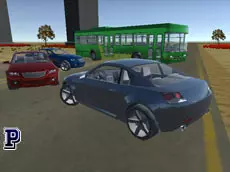
Offroader V5 offers a versatile 3D driving sandbox where players can switch between various vehicles, including cars and buses, to explore environments and test vehicle physics at their own pace.
About Offroader V5
Offroader V5 is a 3D driving simulator that emphasizes exploration and vehicle variety. Unlike traditional racing games, it provides a sandbox environment where the focus is on the mechanics of driving different vehicle types, ranging from nimble cars to larger buses. The inclusion of detailed 3D models and realistic handling allows players to experiment with how various weights and sizes react to the terrain without the constraints of a linear track.
The game is designed for enthusiasts who enjoy technical driving and vehicle manipulation. With features like slow-motion effects and the ability to switch vehicles instantly, it caters to those who want to test the limits of virtual physics. Whether navigating tight corners or managing a heavy payload, the experience is centered on the freedom to drive and the satisfaction of mastering different automotive classes in a free-roam setting.
- Genre: Driving, 3D
- Platform: Browser
- Mode: Singleplayer
- Developer: Faramel Games
- Mobile support: No
- Release: 12/22/2017
Why players like Offroader V5
- Diverse vehicle selection including cars and buses.
- Real-time vehicle switching for varied gameplay styles.
- Slow-motion feature to observe physics and impacts in detail.
- Manual repair and reset options to ensure continuous action.
- Multiple camera perspectives for both immersive and tactical views.
Instructions
 = ride
ESC = back to menu
1 = previous car
2 = next car
C = change view
R = repair car
T = slow motion
P = pause
ENTER = reset car
E = eject payload
SPACE = handbrake
H = hide instructions
How to play
Use the arrow keys to navigate your vehicle through the environment. You can cycle through the available fleet using the number keys to experience different handling characteristics. If your vehicle sustains damage or becomes stuck, use the repair and reset functions to continue. Experiment with the slow-motion toggle to observe how the car reacts to maneuvers, and use the handbrake for tighter control when navigating sharp turns or stopping suddenly.
Tips for beginners
- Switch between camera views to find the best perspective for maneuvering larger vehicles like buses.
- Activate slow motion during stunts or collisions to see the physics engine in action.
- Use the repair key frequently to keep your vehicle in optimal condition after rough off-road driving.
- Utilize the handbrake to initiate drifts or to stabilize the vehicle when descending steep terrain.