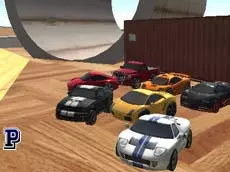
Scrap GL Micro
Scrap GL Micro is a 3D multiplayer driving simulator that invites players to explore open environments, manipulate obstacles, and interact with others in a sandbox-style automotive experience.
About Scrap GL Micro
Scrap GL Micro is a 3D multiplayer driving simulator that emphasizes exploration and environment interaction over traditional racing. The game provides a sandbox setting where players can test vehicle physics and manage various car functions, such as the engine state and manual clutch. It offers a technical approach to driving that rewards precision and experimentation with the game's mechanics.
Beyond simple navigation, the experience includes tools for placing and removing obstacles, allowing for a personalized driving field. The multiplayer component enables social interaction through a chat system and a visible player list. With multiple camera angles available, players can tailor their perspective to suit either creative construction or focused driving maneuvers in a shared online space.
- Genre: Driving, 3D, Multiplayer
- Platform: Browser
- Mode: Multiplayer
- Developer: Ciorbyn
- Mobile support: No
- Release: 07/30/2017
Why players like Scrap GL Micro
- Freedom to manipulate and remove obstacles within the world.
- Technical driving features including manual clutch and engine management.
- Real-time multiplayer environment with active chat and player lists.
- Five distinct camera perspectives for varied gameplay experiences.
Instructions
 = ride
 + CTRL = work with obstacles
1...5 = views
DEL = remove obstacle
R = reset car
SHIFT = clutch
SPACE = handbrake
I = engine on/off
TAB = player list
ENTER = chat
How to play
Drive your vehicle using the arrow keys while managing technical aspects like the engine and handbrake. Use the mouse and control key to interact with obstacles, shaping the environment to your liking. If your car flips or becomes trapped, use the reset key to continue. Cycle through different camera views to find the most comfortable perspective for navigating the map or coordinating with other players in the session.
Tips for beginners
- Use the reset key immediately if your vehicle becomes stuck or overturned to maintain your momentum.
- Experiment with the clutch and handbrake to master the simulator's specific car physics.
- Toggle through all five camera views to find the best angle for placing obstacles or driving.
- Ensure the engine is switched on before attempting to drive after a reset or joining a room.