SplatPed 2
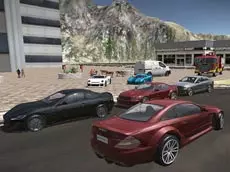
SplatPed 2 is a detailed 3D driving simulator that offers a sandbox environment for players to test various vehicles, perform stunts, and explore a realistic urban landscape.
About SplatPed 2
This sequel focuses on providing a technical and interactive driving experience within a vast 3D city. Players have access to a range of vehicles, each featuring distinct handling and damage models. The game emphasizes freedom, allowing for unrestricted exploration and the ability to test the physics of each car. With a built-in repair system and time-manipulation tools, the simulation encourages experimentation without the pressure of traditional racing objectives.
Designed for enthusiasts of sandbox simulators, the gameplay centers on skill-based maneuvers and environmental interaction. Features like handbrake drifting and multiple camera perspectives provide a customizable experience, whether you are practicing precise parking or high-speed navigation. The inclusion of a slow-motion mechanic adds a cinematic layer to the driving, making it a suitable choice for players who enjoy technical control and physics-based exploration.
Why players like SplatPed 2
- Realistic vehicle damage mechanics paired with an instant repair feature.
- Slow-motion functionality for better control during complex stunts.
- Open-world urban environment that rewards free-roaming exploration.
- Responsive handbrake physics designed for practicing drifts and tight turns.
Instructions
 = drive
 = interaction
ENTER = reset car
C = change camera
SPACE = handbrake
T = slow time
R = repair car
How to play
Navigate your vehicle through the city streets using the keyboard. Use the handbrake to initiate drifts or manage sharp corners effectively. If the vehicle sustains significant damage from impacts, use the repair function to restore its condition. You can switch between different camera angles to improve your visibility and activate the slow-motion feature to observe the physics of your maneuvers or navigate through challenging obstacles with higher precision.
Tips for beginners
- Activate slow motion when performing jumps or high-speed turns to maintain better vehicle stability.
- Switch camera views frequently to get a better sense of your car's dimensions and the surrounding environment.
- Use the handbrake sparingly during high-speed straightaways to avoid losing control of the rear end.
- If your vehicle becomes stuck or flips over, use the reset function to quickly return to the road.