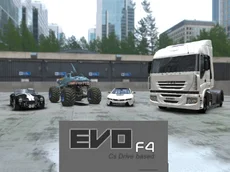
Evo F4
Evo F4 offers a realistic driving simulation where you can operate various vehicles, including trucks with functional arms and forks, in a detailed 3D environment.
About Evo F4
Evo F4 is the fourth installment in the popular Evo-F series, focusing on a sandbox simulation experience. Unlike traditional racing games, this title emphasizes vehicle interaction and free exploration. You can switch between different vehicle types, ranging from standard cars to industrial machinery like trucks equipped with movable forks and arms, allowing for a diverse range of driving experiences.
The game utilizes a 3D engine to provide a detailed world where physics play a central role. Players can manipulate their surroundings, repair their vehicles on the fly, and even use time-slowing mechanics to perfect their maneuvers. It is an ideal choice for those who enjoy open-ended driving simulators and the technical challenge of operating heavy equipment.
Why players like Evo F4
- Varied vehicle selection including industrial trucks and cars.
- Functional mechanical parts like movable arms and forks.
- Instant vehicle repair and reset features for continuous play.
- Slow-motion mode for precise driving and maneuvering.
- Open-ended simulator gameplay without restrictive objectives.
Instructions
 = drive
 = view
C = change camera
R = repair
ENTER = reset car
T = slow time
U = arm up
J = arm down
I = fork up
K = fork down
How to play
Use the WASD keys to navigate your vehicle through the environment. Beyond simple driving, you can operate specialized machinery using specific keyboard inputs to raise or lower arms and forks. If your vehicle sustains damage, use the repair function to stay mobile. Experiment with different camera angles to find the best view for complex maneuvers or use the slow-time feature to handle difficult sections more effectively.
Tips for beginners
- Use the slow-time feature when navigating tight spaces or performing precise lifting with the forks.
- Switch camera views frequently to get a better perspective on your vehicle's mechanical attachments.
- Utilize the repair and reset keys immediately after a crash to keep your momentum going.
- Practice coordinating the arm and fork controls to master the industrial side of the simulation.