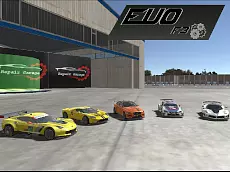
Evo-F3
Evo-F3 offers a detailed vehicle simulation experience where you can drive various cars and heavy machinery, performing precise maneuvers and exploring a specialized driving environment.
About Evo-F3
Evo-F3 is the third installment in the popular vehicle simulation series, focusing on realistic driving mechanics and specialized equipment. Unlike standard racing games, this title emphasizes the technical aspects of vehicle handling. Players can switch between different types of transport, including standard cars and industrial trucks equipped with functional mechanical arms and forks. The inclusion of these utility vehicles adds a layer of skill-based interaction with the environment.
The game is designed for those who appreciate the nuances of vehicle physics and the challenge of operating heavy machinery. With features like time manipulation and instant vehicle repair, the experience prioritizes experimentation and technical precision over high-speed competition. It is an ideal choice for fans of simulators who want to test their driving accuracy across a diverse fleet of vehicles.
Why players like Evo-F3
- Diverse selection of vehicles, including industrial machinery.
- Functional mechanical components like forks and lifting arms.
- Realistic vehicle damage and instant repair system.
- Slow-motion feature for observing physics and maneuvers.
- Open environment suited for technical driving practice.
Instructions
 = drive
 = view
C = change camera
R = repair
ENTER = reset car
T = slow time
U = arm up
J = arm down
I = fork up
K = fork down
How to play
Use the WASD keys to navigate your chosen vehicle through the map. You can switch between standard cars and heavy-duty trucks to experience different handling characteristics. When operating industrial vehicles, use the U, J, I, and K keys to control specialized attachments like forks and arms. If your vehicle sustains damage or gets stuck, use the repair and reset functions to continue your session without interruption.
Tips for beginners
- Use the slow-time feature to navigate tight corners or perform precise lifting actions.
- Cycle through different camera views to get the best perspective for parking or using mechanical arms.
- Utilize the repair key frequently to keep your vehicle in optimal condition after collisions.
- Practice with the forklift controls to understand how weight distribution affects truck stability.