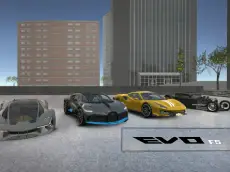
Evo-F5
The fifth installment of the Evo-F series offers a detailed 3D driving simulation where players can operate various vehicles, manage repairs, and use specialized industrial machinery.
About Evo-F5
Evo-F5 is a technical driving simulator that emphasizes vehicle interaction and freedom. Players can switch between different cars and specialized equipment, such as a forklift, allowing for a varied driving experience within a detailed environment. The game focuses on realistic handling and provides tools for players to maintain, repair, or reset their vehicles during a session.
This entry in the series introduces mechanics like time manipulation and manual ignition, catering to players who enjoy a more methodical approach to driving games. Whether you are navigating the streets or experimenting with the physics of the forklift arms, the simulator provides a sandbox-style environment designed for those who appreciate automotive variety and functional depth.
Why players like Evo-F5
- Diverse vehicle selection including industrial equipment like a forklift.
- Realistic interactive features such as manual ignition and on-the-fly repairs.
- Time-slowing mechanic that allows for precise maneuvering in tight spaces.
- High-quality 3D environments and physics-based vehicle handling.
Instructions


ENTER = action button / reset car
R = repair car
T = slow time
I = ignitation
C = change camera
IKJU = control fork
SPACE = handbrake
How to play
Begin by starting your vehicle's ignition using the designated key. Use the arrow keys for steering and acceleration, and the handbrake for controlled stops. If your vehicle becomes damaged or stuck, use the repair and reset functions to continue. When operating specialized machinery, use the specific control keys to manipulate the fork or equipment arms. You can also change the camera perspective to better suit your current task.
Tips for beginners
- Activate the slow-time feature when you need extra precision for complex maneuvers.
- Remember to use the repair key frequently if you are testing the limits of your vehicle's durability.
- Switch to an external camera view when using the forklift to better judge distances and object placement.
- If the vehicle fails to move, double-check that the ignition has been engaged.