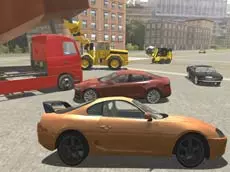
Evo-F
Evo-F offers a detailed vehicle simulation experience where you can drive various cars and trucks, interact with specialized machinery, and explore a sandbox environment at your own pace.
About Evo-F
This driving simulator focuses on freedom and technical interaction. Unlike standard racing titles, Evo-F provides a selection of vehicles ranging from standard cars to specialized industrial trucks equipped with functional arms and forks. The inclusion of repair and reset mechanics suggests a sandbox-style environment where players are encouraged to experiment with different driving styles and machine operations without the pressure of a ticking clock.
The game utilizes a physics-based approach, allowing for realistic movement and vehicle handling. Players can manipulate camera angles to get the best view of their maneuvers or slow down time to observe the mechanics in action. It is an ideal choice for fans of vehicle physics who enjoy exploring a map and mastering the specific controls of diverse automotive machinery.
Why players like Evo-F
- Variety of controllable vehicles including cars and utility trucks.
- Functional industrial tools like adjustable arms and forks.
- Ability to slow down time for precise maneuvers or visual effects.
- Built-in repair and reset features for continuous gameplay.
- Multiple camera perspectives to suit different driving preferences.
Instructions
 = ride
 = interaction
ENTER = reset car
R = repair car
T = slow time
C = change camera
SPACE = handbrake
U = arm up
J = arm down
I = fork up
K = fork down
How to play
Use the WASD keys to navigate your chosen vehicle and the spacebar for the handbrake. Specialized trucks feature moving parts; use the U, J, I, and K keys to operate arms and forks for specific tasks. If your vehicle takes damage or gets stuck, use the repair and reset keys to quickly get back on the road. You can also toggle the camera view to better navigate tight spaces or align your forks.
Tips for beginners
- Use the slow-motion feature when performing complex maneuvers with industrial tools.
- Cycle through camera views to find the most comfortable angle for parking or loading.
- Keep an eye on vehicle damage and use the repair key to maintain performance.
- Experiment with the fork and arm controls to interact with objects in the environment.