Evo-F2
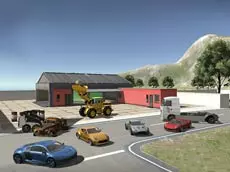
Evo-F2 offers a detailed driving simulation experience where players can operate various vehicles, including trucks with functional parts, in an open environment designed for testing maneuvers and physics.
About Evo-F2
Evo-F2 is a 3D driving simulator that emphasizes freedom and vehicle interaction. Unlike standard racing titles, this entry in the series focuses on the mechanics of different vehicles, ranging from agile cars to heavy-duty industrial trucks. The inclusion of functional components like movable forks and arms adds a layer of technical skill to the driving experience, requiring more than just basic steering.
The game provides a sandbox-style environment where players can experiment with physics and vehicle damage. With tools to repair or reset vehicles instantly, the focus remains on exploration and mastering the specific handling of each machine. It is an ideal choice for players who enjoy technical driving and vehicle-specific utility within a high-quality 3D setting.
Why players like Evo-F2
- Diverse vehicle selection including industrial machinery.
- Interactive vehicle components like adjustable forks and arms.
- Realistic physics with integrated damage and repair mechanics.
- Freedom to explore and experiment without strict objectives.
Instructions
 = drive
 = view
C = change camera
R = repair
ENTER = reset car
T = slow time
U = arm up
J = arm down
I = fork up
K = fork down
How to play
Navigate the environment using standard driving controls. Beyond basic movement, you can operate specialized machinery by adjusting hydraulic arms and forks. If your vehicle sustains damage during complex maneuvers, use the repair function to restore it immediately. You can also manipulate time for better precision or reset your position if you become stuck, while changing camera angles helps with visibility during technical tasks.
Tips for beginners
- Use the slow-motion feature to navigate tight corners or align truck forks with precision.
- Switch camera views frequently to get a better perspective when operating heavy machinery arms.
- Don't hesitate to use the repair key after collisions to keep your vehicle in peak condition.
- Experiment with the reset function to quickly return to the main area if you wander too far.