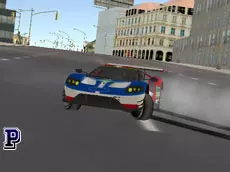
Top Speed Sport Cars
Top Speed Sport Cars offers a detailed 3D driving simulation where you can test powerful vehicles, customize their appearance, and explore environments with realistic mechanics like manual ignition.
About Top Speed Sport Cars
This Unity 3D driving simulator focuses on the technical feel of handling high-performance vehicles. Unlike standard arcade racers, it incorporates specific mechanics such as manual ignition and clutch control, providing a more deliberate and immersive driving experience. Players have the freedom to cycle through various cars and instantly modify their colors to suit their preferences while navigating the 3D environment.
The game emphasizes exploration and automotive appreciation. With multiple camera angles and a dedicated snapshot feature, it is designed for players who enjoy both the physics of driving and the visual design of sports cars. A quick repair function is also available, ensuring that any damage sustained during high-speed maneuvers can be fixed immediately to keep the session going.
- Genre: Driving, 3D
- Platform: Browser
- Mode: Singleplayer
- Developer: Faramel Games
- Mobile support: No
- Release: 08/04/2017
Why players like Top Speed Sport Cars
- Realistic simulation features including manual ignition and clutch mechanics.
- Ability to switch vehicles and change car colors on the fly.
- Multiple camera perspectives to enhance the driving experience.
- Integrated snapshot tool for capturing high-quality vehicle images.
Instructions
 = ride
 = change car color
T = snapshot
R = car repair
GH = change car
C = change camera
I = ignition
SHIFT = clutch
SPACE = hand brake
How to play
Begin by using the ignition to start your engine. Navigate the world using the arrow keys, utilizing the clutch and hand brake for technical maneuvers. You can cycle through the available sports cars and change their paint jobs using your mouse. If your vehicle becomes damaged, use the repair key to restore it. Switch camera views to find the most comfortable perspective for your driving style.
Tips for beginners
- Always remember to engage the ignition; the car will not move until the engine is started manually.
- Use the hand brake in combination with steering for more responsive handling during tight turns.
- Experiment with the various camera angles to better judge distances and vehicle positioning.
- Utilize the snapshot key after customizing your car's color to save your favorite designs.