Build & Crush
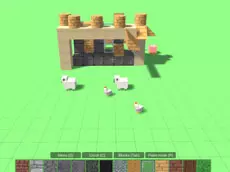
Build & Crush offers a creative 3D environment where you can construct elaborate structures from blocks and then choose various methods to dismantle or destroy them completely.
About Build & Crush
This block-based simulator provides a dual-mode experience focused on creativity and destruction. In the construction phase, you use a variety of materials to assemble detailed 3D structures, drawing inspiration from voxel-style building mechanics. The interface allows for precise placement and material selection, giving you full control over the design and scale of your architectural projects.
Once a creation is finished, the gameplay shifts toward demolition. You can test the integrity of your work or simply enjoy the process of tearing it down using different tools and methods. Whether you prefer the methodical planning of a builder or the chaotic energy of a crusher, this game caters to both playstyles within a flexible, 3D sandbox setting.
Why players like Build & Crush
- Freedom to switch between constructive building and satisfying destruction.
- A wide range of materials and blocks for diverse architectural designs.
- Intuitive 3D movement and placement controls for precise construction.
- Stress-relieving gameplay centered around dismantling complex structures.
Instructions
 = move
SHIFT = up
SPACE = down
 = build, crush, choose
TAB = choose material
Q = menu
How to play
Use the WASD keys to navigate the 3D space, with Shift and Space controlling your vertical elevation. Select materials from the menu using Tab and place blocks with the mouse to build your structure. Once finished, switch modes to begin the demolition process. Use the mouse to select your preferred crushing method and target specific areas of the build to watch it crumble or disassemble.
Tips for beginners
- Use the vertical movement keys to reach high points or get a better view of your structure's layout.
- Experiment with different materials via the Tab menu to add visual variety to your creations.
- Plan your demolition by targeting the base of structures to see how the blocks react.