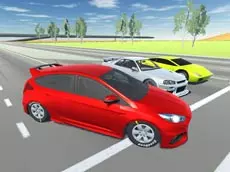
Offroader V6
Offroader V6 is a realistic driving simulator that lets you experiment with various vehicles, from cars to trucks, across open environments designed for testing physics and drifting capabilities.
About Offroader V6
This driving simulator focuses on vehicle physics and exploration rather than strict racing objectives. Players can switch between different vehicle types, including heavy trucks and buses, to see how they handle various terrains. The inclusion of a damage system and a repair function allows for high-impact driving without permanent consequences, encouraging experimentation with stunts and high-speed maneuvers.
The technical nature of the game appeals to fans of realistic handling and drifting mechanics. With features like slow-motion toggles and multiple camera perspectives, the experience is tailored for those who enjoy capturing cinematic moments or analyzing vehicle behavior under stress. It provides a sandbox-style environment where the primary goal is to master the unique controls of each machine.
- Genre: Driving
- Platform: Browser
- Mode: Singleplayer
- Developer: Smartline-Games
- Mobile support: No
- Release: 11/27/2018
Why players like Offroader V6
- Diverse vehicle selection ranging from standard cars to large trucks.
- Realistic physics engine that emphasizes drifting and handling.
- Cinematic tools like slow-motion and multiple camera angles.
- Instant repair and reset features for uninterrupted gameplay.
- Open-ended simulator environment with no strict time limits.
Instructions


SPACE = handbrake
R = repair car
ENTER = reset car
C = change camera view
T = slowmotion
P = freeze car movement
How to play
Choose a vehicle and navigate through the environment using the keyboard. Focus on mastering the handbrake to initiate drifts or test the limits of your suspension on uneven terrain. If you crash or get stuck, use the repair and reset keys to quickly continue your session. You can change the camera view to find the best angle for driving or use the slow-motion feature to observe the physics in detail.
Tips for beginners
- Use the handbrake to maintain control during sharp turns and drifts.
- Toggle slow-motion when performing jumps to see how the vehicle reacts to impact.
- Switch camera views frequently to help with precision parking or navigating tight spaces.
- Use the repair function immediately if vehicle performance degrades after a collision.