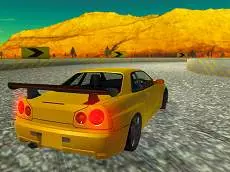
Turbosliderz
Turbosliderz is a high-speed driving simulator where players master the art of drifting and precision racing using responsive keyboard controls across various challenging tracks and perspectives.
About Turbosliderz
This Unity-powered racing game emphasizes the technical side of driving, focusing heavily on car control and momentum. Players navigate through courses that reward skillful handling, utilizing a dedicated handbrake mechanic to initiate drifts and a boost system for extra speed on straightaways. The simulator-style approach provides a more grounded experience compared to typical arcade racers, demanding focus and timing to maintain the ideal racing line.
The game offers multiple camera angles, including rear-view and side-look functions, allowing for better spatial awareness during tight maneuvers. Whether you are aiming for the fastest lap or perfecting a long slide, the combination of physics-based movement and responsive inputs makes it a solid choice for fans of skill-based driving games looking for a challenge.
- Genre: Driving
- Platform: Browser
- Mode: Singleplayer
- Developer: Smartline-Games
- Recommended age: 3+
- Mobile support: No
- Release: 04/29/2019
Why players like Turbosliderz
- Responsive drifting mechanics using a dedicated handbrake.
- Multiple camera perspectives for improved visibility and immersion.
- Satisfying sense of speed when utilizing the boost function.
- Skill-based gameplay that rewards precise car control and timing.
Instructions
 = drive
SPACE = handbrake
SHIFT = boost
V = change camera
QE = look left, right
C = look backwards
How to play
Use the arrow keys to steer and accelerate through the course. To handle sharp corners, engage the handbrake with the spacebar to initiate a drift. Manage your momentum by applying the boost with the shift key when you have a clear path ahead. Switch between different camera views to find the best angle for the current track layout, and use the look-around keys to monitor your surroundings while navigating tight turns.
Tips for beginners
- Tap the handbrake briefly rather than holding it to maintain better control during a slide.
- Save your boost for long straight sections to maximize your top speed without losing grip.
- Cycle through camera views using the V key to find the perspective that best suits your driving style.
- Use the side-look keys to check your positioning when approaching apexes or obstacles.