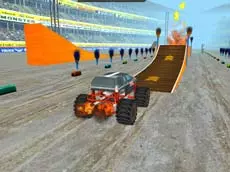
Ultimate Stunts 3D
Experience high-speed driving and aerial acrobatics in Ultimate Stunts 3D, a Unity-powered car game designed for players who enjoy performing complex tricks and maneuvers in a 3D environment.
About Ultimate Stunts 3D
Ultimate Stunts 3D is a driving game that focuses on vehicle control and stunt execution. Built on the Unity engine, it offers a spatial environment where players can test their handling skills while navigating various terrains. The core experience revolves around balancing speed with precision to successfully land maneuvers and maintain momentum.
This title appeals to fans of technical driving who want more than just a standard race. By integrating specific trick commands into the driving mechanics, the game challenges players to multitask between steering and performing stunts. It provides a focused environment for mastering car physics and exploring the limits of aerial control through a dedicated keyboard-based input system.
- Genre: Driving
- Platform: Browser
- Mode: Singleplayer
- Mobile support: No
- Release: 07/14/2015
Why players like Ultimate Stunts 3D
- Dedicated trick system using specialized keyboard inputs.
- Smooth 3D graphics powered by the Unity engine.
- Focus on technical vehicle handling and aerial maneuvers.
- Straightforward arcade-style driving mechanics.
Instructions

J K L = tricks
How to play
Use the WASD keys to steer and accelerate your vehicle through the environment. As you gain air or find suitable space, utilize the J, K, and L keys to perform different stunts. Success depends on maintaining control of the car while timing your tricks to ensure a safe landing. The goal is to explore the available space and maximize your stunt potential without losing momentum or crashing.
Tips for beginners
- Gain sufficient speed before attempting tricks to ensure you have enough airtime.
- Experiment with combinations of the J, K, and L keys to see different stunt variations.
- Focus on leveling the car before touching the ground to ensure a stable landing.
- Use the WASD keys mid-air to help stabilize your vehicle's trajectory.