- Games
- Multiplayer
- Office Strike 2
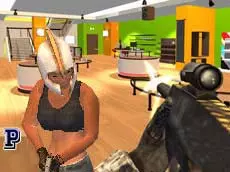
Office Strike 2
Office Strike 2 is a 3D multiplayer first-person shooter set in an office environment, offering fast-paced gunplay and tactical movement for fans of competitive arena combat.
About Office Strike 2
This sequel brings high-intensity FPS action to a workplace setting. Players engage in multiplayer battles using a variety of firearms, navigating through cubicles and hallways. The 3D environment encourages verticality and strategic positioning, making every corner a potential encounter. It focuses on traditional shooting mechanics where reflexes and spatial awareness are key to success.
The game caters to players who enjoy classic arena-style shooters with a modern twist. With a selection of weapons and different movement stances like crouching and going prone, it provides a solid foundation for tactical exchanges. It is an accessible browser-based option for those looking for a quick competitive match or a more dedicated session.
- Genre: Multiplayer, 3D, Action
- Platform: Browser
- Mode: Multiplayer
- Developer: oneru220
- Mobile support: No
- Release: 05/15/2017
Why players like Office Strike 2
- Fast-paced multiplayer matches in a relatable office setting.
- Fluid 3D movement including jumping, crouching, and prone positions.
- A variety of weapons accessible through hotkeys for different combat ranges.
- In-game chat feature for communicating with other players during matches.
Instructions


TAB = pause menu
1...5 = weapons
R = reload
SHIFT = run
CTRL = prone
C = crouch
SPACE = jump
T = chat
ENTER = send message
F = pick up weapon
P = fullscreen
Q = previous weapon
E = next weapon
How to play
Join a server and navigate the map using standard movement keys. Use your mouse to aim and fire at opponents while cycling through your arsenal with number keys. Strategic movement is vital; use the shift key to sprint between cover and utilize the crouch or prone keys to reduce your profile and improve your tactical advantage during firefights.
Tips for beginners
- Use the prone stance to hide behind low office furniture or narrow gaps.
- Reload your weapon during quiet moments to ensure you are ready for the next encounter.
- Keep an eye out for dropped weapons and use the interaction key to swap your current loadout.
- Utilize the sprint function to cross open spaces quickly and minimize exposure to enemy fire.