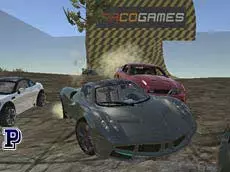
Scrap Metal
Scrap Metal is a 3D driving sandbox where you can experiment with high-speed physics, manipulate obstacles, and test the durability of various vehicles in an open environment.
About Scrap Metal
This title emphasizes freedom and vehicle interaction within a physics-driven playground. Players can drive across open terrain, utilizing a variety of camera angles to observe how cars respond to different impacts and maneuvers. It is less about traditional racing and more about exploring the limits of the driving engine and the structural integrity of the vehicles provided.
With tools to move obstacles and a dedicated repair system, the gameplay allows for continuous experimentation. The inclusion of technical controls like a clutch and manual gearbox appeals to players looking for a more detailed driving simulation. It is an ideal choice for those who enjoy technical driving and physics-based destruction without the pressure of specific objectives or time limits.
Why players like Scrap Metal
- Realistic vehicle physics and damage modeling.
- Freedom to manipulate and reposition obstacles in the environment.
- Multiple camera perspectives to capture stunts and crashes.
- Detailed driving mechanics including manual shifting and slow motion.
Instructions

 + CTRL = move with obstacles
1...7 = view
T = slow motion
SHIFT = clutch
FV = gearbox
SPACE = handbrake
ENTER = reset car
SHIFT + R = repair car
How to play
Navigate your vehicle using the arrow keys through the open map. Use the handbrake for drifts or quick stops. If your vehicle sustains too much damage during stunts, use the repair shortcut to restore it instantly. You can also interact with the environment by holding the modifier key and using the mouse to reposition obstacles, allowing you to create custom jumps or barriers anywhere on the field.
Tips for beginners
- Activate the slow-motion toggle to observe physics and crashes in greater detail.
- Cycle through the seven different camera views to find the best angle for specific stunts.
- Use the reset function if your car becomes stuck or flipped to quickly return to action.
- Experiment with the manual gearbox and clutch for more precise control over the car's torque.